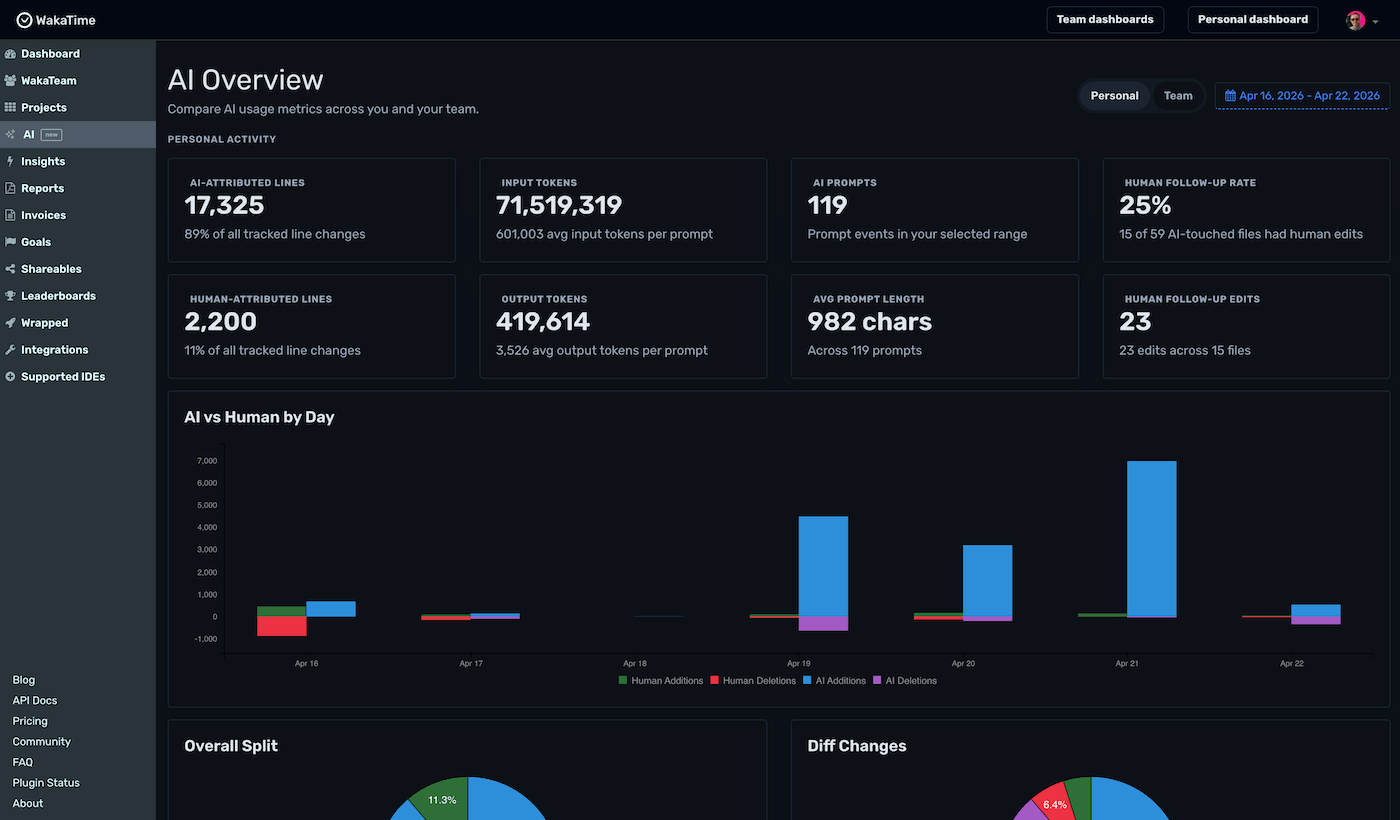
Most tools tell you AI is in the codebase. WakaTime tells you how it’s really being used — and whether it’s actually helping.
Track AI spend across every model, with a per-dev breakdown so teams can stay on budget. Spot your costliest model and keep AI bills predictable.
Follow and monitor how AI is being adopted across your company. WakaTime shows how much AI each dev is using and how many lines are AI-generated vs human-written.
See how often your team rewrites AI-generated code with the Human Follow-up rate. Prove AI is shipping, not creating more work.
Add WakaTime to your editor or AI model. Works with Claude Code, Cursor, Copilot, Codex, and more.
Prompt, accept suggestions, and commit as you usually do. WakaTime quietly captures the signal in the background.
See AI-attributed changes, prompt length, token usage, and the human follow-up — by project, by day, by teammate.
 Claude Code
 Codex
Codex
 Continue
 Cody
Cody
 Roo Code
 OpenCode
 GitHub Copilot
 Cursor
 Windsurf
 Qoder
Qoder
 Kiro
Kiro
 Cline
Cline
 Gemini
 Pi
Pi
 Goose
Goose
Free for individuals. Invite your team in one click.
Create Free Account